















How to Create
Referential integrity is configured in the following ways:
- Table Lookups—When a table lookup is established, select the Reload Data button in the Referential Integrity Setup application to view the records. Open the records associated with your table lookup to select the Integrity Mode.
- User Defined Field Mappings subtable—Fields that are connected but are not table lookups must have records manually created. Select the Create button and fill in the User Defined Field Mappings subtable.
In referential integrity, there are two types of tables involved:
- Foreign table—Contains records that are referenced in base tables. Foreign table records can be associated with multiple base tables, so when a record is being deleted in a foreign table, referential integrity checks every base table associated with the foreign table.
- Base tables—Contain referenced records from the foreign table. Records from this table can be deleted and are not subject to referential integrity enforcement unless they are a foreign table to another base table.
The diagram below displays enforced referential integrity between two tables.
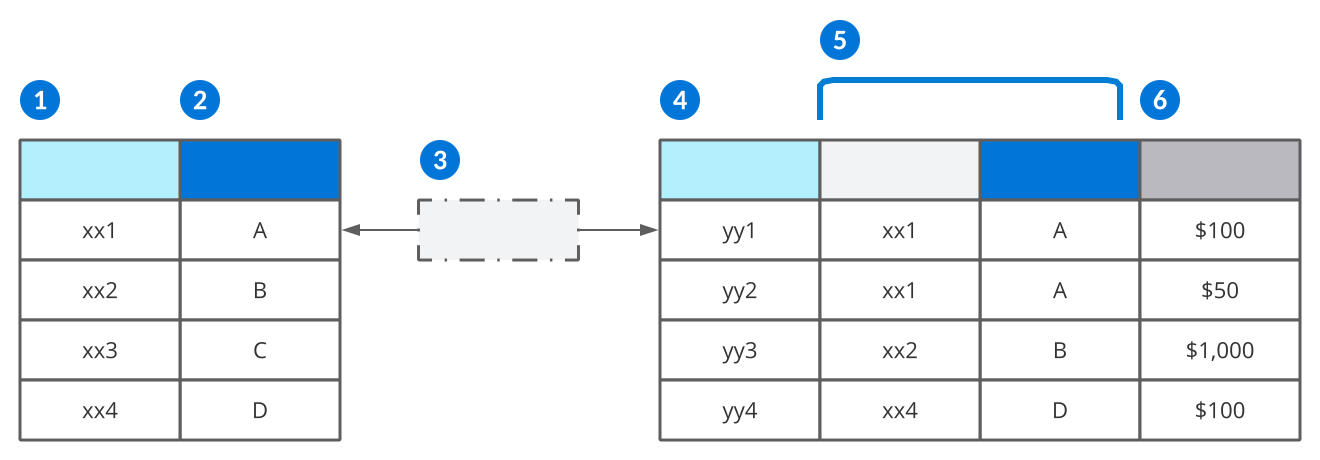
 | Foreign Table nwId—The unique nwId for records in the foreign table. This field is hidden. |
|---|---|
 | Foreign Table Fields—Records in a field on the foreign table. |
 | Referential integrity—Checks base tables for referenced records from the foreign table when a user tries to delete a foreign table record. If the same, unique combination of fields that make up the foreign record is found in a base table, referential integrity stops checking any other base tables and immediately throws an error. Referential integrity exists between the two tables because the base table has a table lookup on the foreign table's field. |
 | Base Table nwId—The unique nwIds for records in the base table. This field is hidden. |
 | Table Lookup—A table lookup of the foreign table on the base table. The table lookup points back to a specific record in the foreign table and has the nwId from that foreign record associated with it. Learn more about in the Table lookups and foreign keys topic. |
 | Base Table Fields—Fields on the base table. |
In this example, only record xx3, C could be deleted from the foreign table. Since the other records in the foreign table are referenced in the base table, referential integrity protects those records from being deleted.
Integrity modes
Once a record appears in the list, you can change the status of referential integrity for each record through the Integrity Mode field. Integrity mode dictates whether referential integrity enforcement is enabled or disabled. Subtables are currently ineligible for referential integrity enforcement. The different integrity modes are:
| Integrity mode | Mode explanation |
|---|---|
| Default Off | Referential integrity is not applied to this record. This is the default mode applied to all new records. |
| Enforced | Referential integrity is enabled for this record. This ensures that deletions are not allowed in foreign tables, and returns a referential integrity error with the base table and field in conflict identified. |
| Off | Referential integrity is purposefully turned off for this record. |
| Ineligible | Referential integrity is disabled for this record's combination. This mode is automatically configured in a table that's using a subtable. It allows the user to delete the main record without deleting every row in a subtable first. |
Referential Integrity Setup application
Application developers use the Referential Integrity Setup application to prevent records from being deleted if they are being referred to from another table.
Use this application when you want to prevent a record from being deleted if the record contains a primary key that is referenced by another table's foreign key.
Records that define referential integrity between tables are created and stored in the Referential Integrity Setup application. These records can be created using different two methods:
- Automatic Records – Created when table lookups are built and saved. The record does not appear in Referential Integrity Setup until you select the Reload Data button in the application.
- Manual Records – Created using the Create button to set up user defined field mappings for fields that are not table lookups.
Once records exist in the Referential Integrity Setup application, referential integrity can be enabled or disabled through the record's form action. This reflects in the Integrity Mode on the list form field.
See the Referential integrity section for more information on configuring referential integrity.
Referential integrity best practices
Referential integrity ensures that the user cannot delete a record in a table if the record is being referred to in another table.
Referential integrity is configured for tables in the Referential Integrity Setup application. New foreign key relationships can be loaded by using the Reload Data action and should always be reviewed at the end of every release.
New foreign key relationships are loaded with the referential integrity set to . Each instance should be evaluated and changed to or . Once a referential record has been updated to or , the Reload Data action will not overwrite that selection. If the Integrity Mode is set to use the Notes field to give an explanation. The Enable row action can be used to set the Integrity Mode to and the Disable row action can be used to set the Integrity Mode to .
Some records will be loaded with a Integrity Mode of . These are usually for tables, which should be deleted when the base record is deleted. If referential integrity is enabled, all subtable records would have to be deleted prior to deleting the record that contains the subtable records. The system recognizes this relationship and automatically sets the Integrity Mode for these types of records. A record can be deleted from the Referential Integrity Setup application, but if the table was not altered and the Reload Data action is used, that record would be brought back in at .
Set the Integrity Mode to for the following type of tables and data:
- Any table that contains setup, master, or transactional business data that should not be deleted if it is referenced in another table. For example, an item should not be deleted if it is referenced by an inventory location, item ledger transaction, purchase order, or sales order. Or a sales order should not be deleted if it was used to create a drop ship purchase order. Or once a transaction is recorded in the item ledger for a procurment order detail, that procurement order detail should not be deleted.
- The examples above can be found in any combination of the following Type: , , , or . Each table and field relationship should be evalauated and understood prior to enforcing referential integrity.
- tables, the report will break if the data it references is deleted.
Set the Integrity Mode to for the following type of tables and data:
- , these types of table never store data, they just show data from other tables.
- , and , these types of tables are not loaded into the Referential Integrity Setup application.
- For any tables that are designed to move data or temporarily use the data for a process, rather than store it. This statement could apply to any table type.
- explicity means the data is not stored, but other tables could have similiar use cases even if the table type is not set that way. , , , or tables could also be used this way, if so, referential integrity is not needed.
- For example, BackorderReleaseHeaderLB and BackorderReleaseDetailLB tables are loaded and used for a process, but the data in this table is never stored long-term, so no referential integrity needs to be setup for items or sales orders that are referenced in these tables.
- Any table used for integrations, these are designed to move data from an external source. Once the data is uploaded successfully, the data in the integration table is typically deleted.
- Any table used for reports, these are designed to only be used when running a report. The data in these tables is purged on a schedule.
- Any tables used for Test Harnesses.
- Any table referencing the CurrencyConfig table, these values are delivered and can never be deleted by an end user.
- Any field that is configured as a common field on a table, that is already on the table.
- Any fields that are already enforced in an upstream transaction and the downstream transaction requires and enforces integrity with that upstream transaction. For example, the directory fields on the work order transaction tables (i.e. WOMaterialTransactionLines) do not need to be enforced since they were enforced on the work order header table (i.e. WorkOrderHeaders) and the work order tables are (i.e. WorkOrderComponents and WorkOrderOperations) required and enforced on the transaction table (i.e. WOMaterialTransactionLines). Production capacity tables (i.e. ProductionCapacitySupplyOrders) do have referential integrity turned on for directory fields, since a work order is optional on these transactions.
- Any fields in report parameter tables, these are tables that that define the inputs for reports. These are typically downstream from transactional data and would provide very little value to check since most field would have already been enforced in the transaction record. For example, directory fields on the sales order report do not need to be enforced because those fields would have been enforced on the sales order table itself.
- Most report parameter tables will have the following fields included in the of ReportAppConfigFields. These should be set to :
- ReportSettingNameTextTL - table lookup of type text to ReportSettings
- ReportLayoutTextTL - table lookup of type text to Reports
- BucketDefinition (Optional in some tables) - table lookup of type text to ReportBucketDefinitions
- Most report parameter tables will have the following fields included in the of ReportAppConfigFields. These should be set to :
Manually create a User Defined Referential Integrity record that has a Integrity Mode of for tables that contain the following type of data:
- Foreign key references that are not defined as table lookups.
- For example, most transaction tables do not store a table lookup to the ItemOrgUnits table. Instead, they store a table lookup to the Directory (i.e. OrganizationalUnit field) and Item tables. If the relationship between the Item and Organizational Unit should remain intact for that table, create a User Defined referential integrity record to prevent the deletion of that item/org unit relationship.
- User Defined: True
- Base Table: the table that needs the item and org unit relationship to remain intact.
- Foreign Table: ItemOrgUnits
- Base Table Fields: data item in the table representing the item, data item in the table representing the organizational unit
- Foreign Table Fields: Item and OrganizationalUnit
- For example, most transaction tables do not store a table lookup to the ItemOrgUnits table. Instead, they store a table lookup to the Directory (i.e. OrganizationalUnit field) and Item tables. If the relationship between the Item and Organizational Unit should remain intact for that table, create a User Defined referential integrity record to prevent the deletion of that item/org unit relationship.