















Use the Nextworld Platform to:
- Build—Create applications and solutions to solve business problems. See Developer Studio.
- Customize—Modify applications for your specific needs. See Customizations.
- Automate—Use tools such as workflow and scheduled jobs to automate business processes. See Workflow Home.
- Integrate—Configure your applications to work with external systems.
- Document—Write reusable, self-updating content using the built-in documentation features. See Documentation guide.
- Report—Build custom reports to analyze business data. See Reporting and analytics.
- Secure—Define what users can view, change, or delete. Nextworld objects are secured by default. See Security.
- Test—Use isolated environments to develop and test your applications before putting them into production. Monitor the functionality of your applications in the background with automated tests. See Environments, business data, and metadata and Application testing.
Anatomy of a Nextworld application
Nextworld applications all follow the same fundamental structure.
The application is where users enter data and view existing records. These records are saved to the table which the application is built over. A table is comprised of data items which become the fields within your application. Logic blocks are also built over the application table and allow you to perform complex operations with the application's data.
The diagram below reviews the structure of an application:
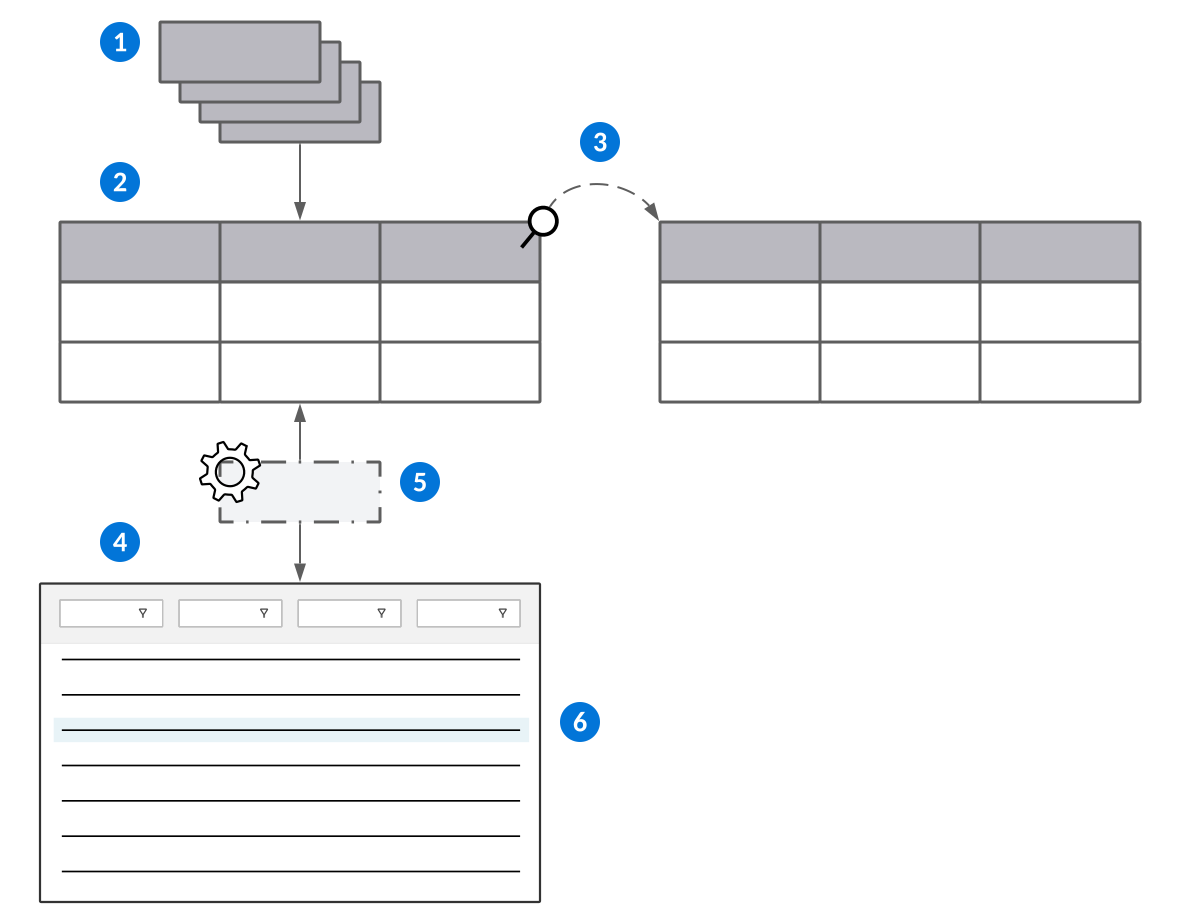
 | Data items—The foundation of all Nextworld applications. Everything is built on data items. |
|---|---|
 | Tables—Built with data items. Groups of related data items make the columns in a table. |
 | Table lookups—Reference data items in other tables to share information. |
 | Applications—Built over tables. Data items in the table are available as fields in the application. |
 | Logic blocks—Control and manipulate fields in applications. Logic blocks allow you to perform complex operations such as hide or show fields, validate entries, and impose conditional requirements. |
 | Records—Row or entry in the table with a collection of values assigned to each data item column in the table. Applications read and write the records in the table. |
Product Families
A product family is a category used to group related metadata objects together. The metadata in a product family is typically packaged as a solution, such as Financials or Artificial Intelligence.
When you create a new metadata object, such as a data item, logic block, or application, you must enter a value in the Product Family field. Metadata is typically migrated, or moved, between environments based on product family. Learn more in Environments, business data, and metadata.
Families are made up of one or more modules, which are a way to further categorize the object. Modules are specific to a single family.
Family Definitions application
Solution developers use the Family Definitions application to manage their product families. Family definitions dictate the dependencies between objects in different families, ensuring metadata migrates correctly and functions properly in downstream environments.
To create a family definition, specify the Family Type and any Dependencies. Always create your family definitions in the YY.nRPDevPartner environment, where you develop your solutions.
In addition to the families that you own, the Family Definitions application also includes the product families from Nextworld that you have access to. When metadata in a family is migrated downstream, the associated family definition is migrated automatically.
Dependencies
Define the additional families as dependencies if you expect to reference objects in those families when creating metadata in the current family.
For example, you might own the family definition for the Financials family, and create a new financials table. If you expect to reference a data item in the Sales Intelligence family in that table, you should list the Sales Intelligence family in the Dependencies subtable on the Financials family definition.
You should set up dependencies between the families you own, but you can also include base owned families as dependencies. However, you must understand how metadata migrates downstream and which solutions your customers activate to avoid broken references. For example, if you shipped your Financials table that referenced a Sales Intelligence data item and the customer did not activate the Sales Intelligence solution, your table would not function in their environments.
Family definitions and metadata validations
Several validation rules rely on your family definitions when they're run from the Validation Workbench application. Additionally, certain rules that rely on your family definitions are validated automatically each time you run a promotion to verify that your metadata is valid for delivery to downstream environments.
For example, you cannot migrate any metadata in a product family with a Family Type of Personal. Learn more in Promotion Manager application.
You can access other rules, such as those related to family dependencies, in the Validation Rule Catalog application. You should perform these validations with the Validation Workbench application on a recurring basis and before you promote your metadata.
For example, you could set up a recurring validation to ensure you are not referencing metadata objects that are not in a dependent family as you develop. Learn more in Validating Metadata.
nwId
Every object in the Nextworld system has a unique identifier associated with it called an nwId.
A nwId is a Globally Unique Identifier (GUID), or a code made up of numbers and letters that distinguish an object from any other existing object. Every object in the system contains an nwId, which is automatically generated when an object is first saved to the database. After an object is saved and has an nwId associated with it, you can never alter the nwId value.
nwHeaderId
An nwHeaderId is the nwId of another table that connects one table to another so that records remain unique to that table pairing. A table automatically populates the nwHeaderId when you link tables together through either:
- A Header Detail structure
- A Subtable used in a Main table
For example, when building a Header Detail structure, you start with a Header table and at least one Detail table with their own nwIds:
| Table type | nwId | nwHeaderId |
|---|---|---|
| Header | 627461da-ce61-11e8-b348-024748a877aa | |
| Detail | 4beb7296-ce61-11e8-b345-024748a877aa | 627461da-ce61-11e8-b348-024748a877aa |
| Detail | fae17972-ce60-11e8-b337-024748a877aa | 627461da-ce61-11e8-b348-024748a877aa |
When you connect the tables in a Header Detail table, the Detail tables capture 627461da-ce61-11e8-b348-024748a877aa as its nwHeaderId. This means that when new detail records are created, those records are unique to that specific header table record.
If one of the Detail tables is used in another Header Detail structure with a different Header table, then the Detail table would capture the nwHeaderId of the other Header table. Detail table records remain separate and unique to their respective Header Detail structures.
Metadata IP protection
Metadata intellectual property, or IP, protection is a feature that is applied to all partner metadata. This feature ensures that your metadata is only visible to customers that have purchased your solutions.
Metadata IP protection is applied in the following ways:
- Most metadata objects–such as data items, tables, and applications, are protected based on the product families configured for your solutions.
- Menus–are protected based on the menu pages that are configured for your solutions. Menu pages are defined in the Solutions Definition application.
- Relationship trees–in applications such as Content Builder and Role Hierarchy Definitions, your metadata is protected based upon the relationship detail records to which the relationship records are attached.
Solution Definitions application
Solution developers use this application to package metadata for delivery of their solutions to customers. Before a solution can be built, it must have product families and menu pages that are part of the solution defined.
Configuration
On this page, define the name of your solution, the product family and product module if applicable, and enter the email address for notification of when an activation of your solution is requested.
Families
Configure the metadata families for your solution on this page.
Menus
Add the menu pages where your solution can be accessed.
Deprecated metadata
When a metadata object is deprecated, it means that the object is no longer supported by Nextworld, or that the object will be removed entirely in a future release. You should avoid using deprecated features, and follow any necessary instructions in the related release notes.
Every metadata object has a Deprecate checkbox. If this checkbox is selected, the Deprecated With field displays the release in which support ceased for the object. These objects display a warning message when the object is accessed in the Developer Studio. For example, if a logic block has been deprecated, a warning displays when it is opened in Logic Block Builder. Certain metadata objects, such as applications and reports, also display a warning if they are launched.
You should check the release notes for important information related to any metadata that's recently been deprecated. Use the Note Category field to filter for Deprecation Notification release notes. If the note has the Action Required checkbox selected, you may need to follow the steps included in the release note to ensure that your data and applications continue to function as expected.
Solution development partners can learn about deprecating their metadata in the Deprecating and removing delivered metadata topic.