















A model is the combination of an algorithm, or set of algorithms, and the training it receives on a set of data. Simply, models are the foundation of all AI and have the ability to make predictions.
Nextworld Intelligence includes applications that allow you to incorporate machine learning models, which are trained using the business data in an individual environment, and large language models (LLMs), which are managed by external organizations such as OpenAI. Both machine learning models and LLMs are implemented with the Model or Prompt Definitions application and the Run Model Definition logic block action.
Machine learning models
A machine learning model can recognize patterns in a dataset and make predictions about records in that dataset. There are different types of machine learning models, such as regression models, which can predict a number, and classification models, which can predict a value from a list of options.
Machine learning models are trained using the data in a single environment and table. The usefulness of these predictions relies on many factors, such as the quantity and quality of the training data and the suitability of the algorithms for the given task.
For example, you could use machine learning to predict the value of a house based on attributes such as square footage and location. These predictions vary based on the set of data the model was trained on.
Implement classification and regression models using automated machine learning model definitions. Application developers define a table and an attribute to predict. Then, system administrators can automatically create and train a set of candidate models using the data in their environment. They evaluate these candidates and select the model that gives the best predictions for their data. Learn more in Automated machine learning model definitions.
Large language models (LLMs)
A large language model (LLM) is intended to understand and generate human language. You can leverage LLMs that exist and are trained outside of the platform, such as OpenAI's ChatGPT, by creating prompt definitions that can dynamically incorporate input values. These models can produce outputs in natural language as well as structured data like JSON. Unlike machine learning models, LLMs are not trained using any data in the platform.
For example, you could use an LLM to determine whether a new directory record is a person or an organization with a prompt such as, "Does ${DirectoryName} resemble the name of a Person or an Organization?" Learn more in Prompt definitions.
Model and prompt definition process overview
The following diagram shows how model and prompt definitions are used in logic blocks that can handle the specified inputs and outputs for the model:
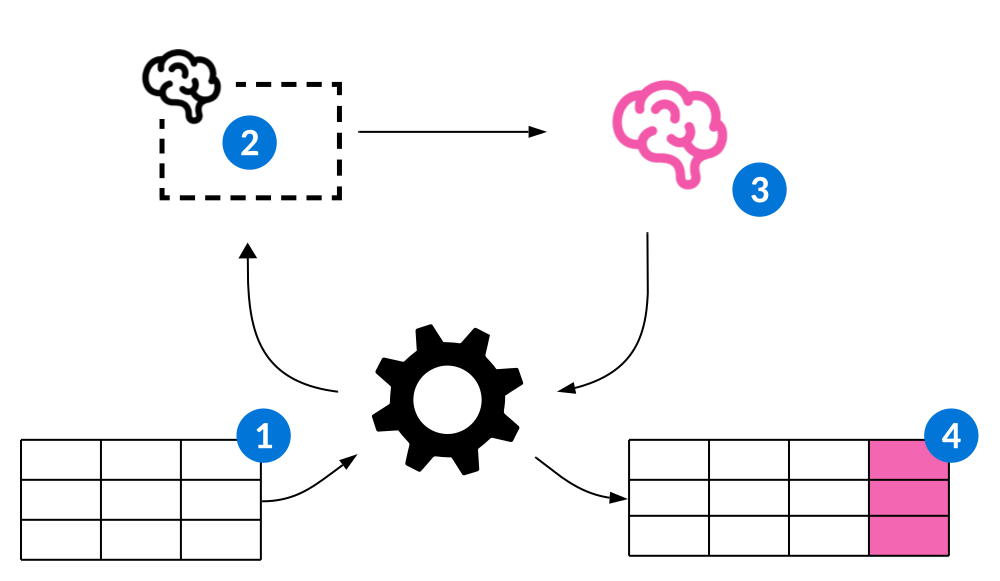
 | Inputs—Records or DSNs are used in the Run Model Definition action within a logic block to pass values to a model. Learn more in Run Model Definition action. |
 | Model or prompt definition—The definition describes the related metadata needed to connect the logic block to the model and pass the model the appropriate inputs. Learn more in Model and Prompt Definitions application. |
 | Model—The model runs and produces a prediction, which is passed back to the logic block as an output. |
 | Outputs—The outputs from the model are available in the logic block, allowing you to conduct more operations and insert the output values into a table. |
Automated machine learning model definitions
Application developers create automated machine learning model definitions and reference them in the business logic of their applications. This allows system administrators to automatically create and train a model suited for the their business and unique business data in their environment.
Machine learning models are always created and trained using the data in a single environment. The best algorithm for each machine learning model may depend on the business data available in the given environment.
System administrators can use automated machine learning model definitions to automatically create a series of candidate models that are trained on their business data. Each candidate includes a thorough analysis of the model's accuracy, reliability, and more. After they compare these candidates, they can activate the model best suited for their business needs.
Create an automated machine learning model definition
Application developers create automated machine learning model definitions, and then use them in logic blocks with the Call Model or Prompt action. Learn more in Models.
Create automated machine learning model definitions in the Model and Prompt Definitions application. Specify a table, and the field in that table a model should predict values for. Additionally, you can specify a filter and any fields that should not be used for training or those that are empty when the model runs. Learn more in Model and Prompt Definitions application and Automated Machine Learning Models application.
Create, train, evaluate, and activate candidate models
System administrators use the Automated Machine Learning Model Definitions application within the Model and Prompt Definitions application to activate machine learning in their environment. After they navigate to an automated machine learning model definition, they can select the Continue form action to start generating a series of candidate models. This process takes some time, but they receive a notification when the process is complete.
Then, they can view a list of models, along with an evaluation of each model that includes detailed information such as the accuracy and performance of each model. After they select the model that's best suited for their business and their data, they can activate it. Learn more in Automated Machine Learning Models application.
Anomaly detection model definitions
Application developers create anomaly detection model definitions that describe the algorithms and metadata used to create, train, and run machine learning models intended to detect anomalies. Using these definitions, anomaly detection models are created and trained with the business data in an individual environment.
Anomaly detection models predict whether a value is unusual and should be examined. For example, the Payment Anomalies dashboard relies on an anomaly detection model that uses a Single Field Numeric Statistical Anomaly Detection algorithm to predict whether a payment amount is an anomaly.
Use the Anomaly Detection Model Definitions application to create and train anomaly detection models. You can use the View Models row action to train models, evaluate models, and more. Learn more in Anomaly Detection Model Definitions application.
Model and Prompt Definitions application
The Model and Prompt Definitions application contains all prompt definitions, automated machine learning model definitions, and anomaly detection model definitions. Application developers use this application to create new model and prompt definitions, and system administrators use it to train and activate machine learning models in their environments.
The Model and Prompt Definitions application lists all the model and prompt definitions. When you create a new model definition, however, you are navigated to one of the following applications:
- Prompt Definitions application
Application builders use the Prompt Definitions application to define prompts for large language models. Prompt definitions are used in logic blocks to incorporate AI into business logic.
- Automated Machine Learning Models application
Application developers use the Automated Machine Learning Model Definitions application to create automated machine learning model definitions they can use in the business logic of their applications. System administrators use it to automatically create, train, evaluate, and activate models in their environment.
- Anomaly Detection Model Definitions application
Application builders use the Anomaly Detection Model Definitions application to create and train machine learning models intended to detect anomalies.
Prompt Definitions application
Application builders use the Prompt Definitions application to define prompts for large language models. Prompt definitions are used in logic blocks to incorporate AI into business logic.
Unlike machine learning model definitions, prompt definitions don't create new models. Instead, they leverage external large language models (LLMs).
To create a prompt definition, define input fields, output fields, and write both a User Prompt and a System Prompt that instruct the LLM on the type of the output you want it to return. The System Prompt should provide general context to the LLM, similar to a persona, while the User Prompt defines the task the LLM should complete.
When the prompt definition runs on a record using a logic block, input values are dynamically inserted into the prompt sent to the LLM provider. Then, the LLM returns a response that populates the output fields. To dynamically include values in your prompt, you must define input fields on the Input Definitions page and include them in your prompt using Merge Text Template Syntax. Learn more in Dynamically include field values in prompt definitions.
Define your output fields on the Output Definitions page. Unless you're describing the JSON structure in the prompt yourself, select the Describe Output Shape checkbox. This automatically amends instructions to the prompt on how OpenAI should structure its response. Using the output fields you define, this ensures that the logic block that runs the prompt definition is able to populate these fields.
Learn more in Prompt definitions.
Input Definitions page
Use the Input Definitions page to define the fields that the model can act on when it runs. The field(s) you select must be on the Table table.
The inputs you define are used in a logic block with the Call Model or Prompt action, which passes the input values from a record to the model.
Output Definition page
Use the Output Definition page to define the fields where the output is stored when the model runs. The fields you select must be on the Output Data Shape table.
Try It Out page
Use the Try It Out page to test the effectiveness of your prompt using sample input values.
The Input Fields subtable includes all the input fields you defined on the Input Definitions page. Specify a Value for each input, and then select the Run field action. After the LLM processes your request, you can view the complete prompt that was sent and the LLM's response. You can run multiple tests without saving the prompt definition record.
For example, if your prompt was "What is the current sales tax rate for the ${ZipCode} area code?" you could test the accuracy of this prompt by specifying different values for the ZipCode field and validating the results.
Automated Machine Learning Models application
Application developers use the Automated Machine Learning Model Definitions application to create automated machine learning model definitions they can use in the business logic of their applications. System administrators use it to automatically create, train, evaluate, and activate models in their environment.
Application developers create new automated machine learning model definitions. When a system administrator is ready to create and train a series of candidate models, they select the Create New Models form action.
Learn more in Automated machine learning model definitions.
Definition page
Application developers use the Definition page when creating new automated machine learning model definitions. They can apply a filter for the data, and prevent certain fields from being used to train models.
They use the Excluded Fields subtable to list any fields that should be excluded when a system administrator creates and trains models using this definition. They should list fields that they know are empty when the model runs, or those that may influence the training of the model. They should not list any fields to exclude simply because they feel they may not be relevant in training the model.
For example, an application builder may be creating an automated machine learning model definition using a table with fields such as Revenue, Costs, and Profit. If they need to predict Profit a week before Revenue is known, they should list the Revenue field in the Excluded Fields subtable. This is because that value is unknown at the time the model runs. If Revenue is used to train the models, the accuracy metrics may appear very high, but the model will not be successful when actually making predictions.
Field Analysis page
Use the Field Analysis page to view a list of all the fields that may be used to train each model. You can remove any of these fields by selecting them and using the Remove Selected Fields row action. You should remove fields if you have added a field, or created a customer defined attribute, which could adversely influence the training each model receives. This is similar to the Excluded Fields subtable, which application builders use when creating the automated machine learning model definition. Learn more in the Definition page section above.
When you're ready to create and train the candidate models, select the Continue form action.
Candidates page
Use the Candidates page to review the series of candidate models and activate the one best suited for your business needs and data. All of the models include the same Training Data Quality value, which indicates how reliable the models are based on the amount of business data available in the table.
Select each model to view a series of attributes you can use to evaluate it. For classification models, the Accuracy displays the percentage of time the model correctly identifies the correct attribute for the record. For regression models, the Accuracy value is the average distance between the prediction and the actual value.
While the accuracy of each model is important, you should also review the Mean Absolute Error, which displays for regression models, or the Confusion Matrix, which displays for classification models. These visualizations can provide you with important context beyond the accuracy of the model alone so that you can pick the best model for your business.
For example, you may be evaluating a series of classification models that predict whether items have a Fragility Level of Low, Medium, or High. While one model may have a higher overall accuracy, you may look at the Confusion Matrix of each model and discover that another model is more accurate when predicting High fragility levels. If your business processes require that extra care be taken with only items that have a Fragility Level of High, but not Medium or Low, you might choose to use the latter model, even if it's less accurate overall.
Additionally, the Feature Importance visualization illustrates how important each attribute of your data is for each model to make accurate predictions.
When you chose a model, use the Make Candidate Selection action to activate it. When you activate a model, all other candidate models are deleted. If you decide not to activate a model, use the Cancel Training form action to delete them all.
Evaluation page
Use the Evaluation page to review the current active model.
Anomaly Detection Model Definitions application
Application builders use the Anomaly Detection Model Definitions application to create and train machine learning models intended to detect anomalies.
To create an anomaly detection model definition, define the Type of model(s) you need to create, the algorithm the model should use, and the input and output data sources.
In the Table field, select the table that contains the data used to train and run the model(s). You can use the Filter field to further refine this dataset so that the model is trained on the correct data. For example, you can define a model that's only trained on records in particular workflow states.
Depending on your use case, you may need different models for different records in the table. Use the Group By Field field to create a distinct model for each unique value in that field. For example, the Login Anomaly Detection dashboard uses models that are created and trained on the login history for each unique user.
Use the Create Model form action to create the model(s), and the View Models action to open the Models mini app, where you can train models, rebuild models, and more. Learn more in Models mini app.
Input Definition page
Use the Input Definition page to define the fields that the model can act on when it runs, as well as the field where the model should store its output. The fields you select must be on the Table table. The inputs you define for an anomaly detection model definition are used to both train and run the model(s). These inputs are crucial to the accuracy of the models you create.
To specify a field as the output field for your model, select the Model Output checkbox. You can only specify a single output field.
Depending on the algorithm you select, only certain data item types are supported for output fields. For example, the output field for a One Class SVM algorithm must be a True False data item.
Models mini app
Application developers use the Models mini app within the Anomaly Detection Model Definitions application to train and evaluate anomaly detection models created in the current environment.
In order for a model to be used in the business logic of your applications, it must be trained. Use the Train Model row action to train the model on the business data in the environment. If the anomaly detection model definition uses a Group By Field field, there may be multiple models in the environment. Use the Train Model Group action to start training each of them.
Depending on the type of algorithm and the available business data in the environment, some models may be more accurate than others. For models that use supervised machine learning algorithms, you can use the Evaluate Model action to calculate the Accuracy and the Training Data Quality of the model.
Use the Rebuild Model row action if changes occur to the metadata in your environment related to the model. For example, you need to rebuild the models if new input or output fields are added to the anomaly detection model definition, or if there are changes to the data sources themselves.
Run Model Definition action
Application developers use the Run Model Definition logic block action to pass inputs to a model, run the model, and handle the model's outputs.
To use the Run Model Deifnition action using a valid model or prompt definition, configure the inputs for the model to use when it runs, as well as what to do with the model's outputs.
Use field mappings to pass input values to the model. Make sure you map values to the input fields defined on the definition you select.
If the model runs and successfully creates an output, it's returned as a DSN in the shape of the output table defined on the definition. The output fields on the definition are populated by the model in the DSN that's returned. You can then use these values in other logic block actions by referencing the DSN.
When you specify a prompt definition to run a LLM, the values you include in your input DSN are interpolated into the prompt defined on the prompt definition before it's sent to the LLM.
Anomaly detection model definition considerations
Some anomaly detection model definitions use a Group By Field to create multiple models based on the unique values in that field.
If this is the case, you must include the Group By Field value in the input DSN so that the system knows which model to run. In addition, there must be an existing model that matches this value for the model to run successfully.
For example, the models that power the Login Anomaly Detection dashboard are specific to each user. In order to run the correct model, the input DSN must specify the user.
Model aliases
Model aliases are built over Foundation Model records in the AI Model Version Setup application. They provide a single access point to update the model used in different configurations across the platform.
Foundation Model records
Every model available in the platform has a Foundation Model record in the AI Model Version Setup application. Foundation Model records make a specific model version available for use in prompt definitions and agents. You can reference a Foundation Model record directly in a configuration, or you can create an Alias that points to it.
Because model providers release new versions periodically, Foundation Model records can become outdated. Model aliases solve this problem by giving you a stable reference point that you can update without touching individual configuration records.
Alias Records
An alias can declare the input and output modes it supports, such as Image and Text in and Text out. When you save an alias or change the model version it references, the platform checks that the model version supports those modes. For example, an alias that declares Image and Text input cannot reference a model version that accepts only text.
Alias records are also created and managed in the AI Model Version Setup application. An alias references a Foundation Model record and can be assigned a user friendly display name, such as PLATFORM_FAST_STABLE, instead of a specific model version name like Claude Opus 4.6. This makes aliases easier to identify and select in configuration records.
When new models are released, the platform automatically changes the underlying Foundation Model record for delivered aliases so every configuration record that references them is updated.
Delivered Aliases
Nextworld delivers alias records for the following models:
- PLATFORM_FAST—Responds quickly and with the least expense, but does not spend as much time researching or processing an answer.
- PLATFORM_REASONING—Responds more slowly and has higher cost, but is more thorough with its researching.
- PLATFORM_STANDARD—Middle ground between FAST and REASONING.
Each model includes two versions:
- STABLE—The recommended version. Nextworld updates this alias after a new model version has been tested and stabilized.
- PREVIEW—The version used to test new models before they become the stable version.
Nextworld's aliases use Anthropic's models. These aliases are available for selection in Model fields across configuration records.