















Types of data
Business data refers to the records created in applications, such as directory records, invoices, GL accounts, and more. Business data exists only in the environment where it was created.
Metadata refers to the applications on the platform, and the components that make up those applications, such as data items, tables, and logic blocks. Metadata can move, or migrate, between environments as part of the development process. Metadata is migrated based on the product family assigned to each metadata object.
Most metadata is created by Nextworld and its solution development partners. This metadata is delivered to customers as part of a solution, such as Financials or Manufacturing. However, customers also create and customize metadata in their environments. A metadata object's ownership dictates who has control over and responsibility for a metadata object. Learn more in Metadata ownership and namespacing.
Elements of an environment
The following diagram shows the different elements of an environment:
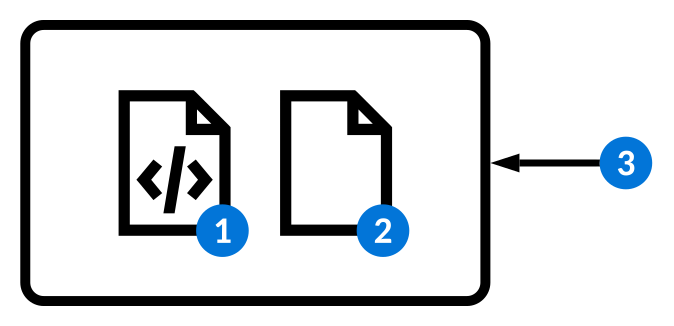
 | Metadata |
 | Business data |
 | The version of the software that powers the platform |
Tenants
Each organization that does business or develops applications on the platform belongs to a tenant. You can only access the data in your own tenant.
Standard environment implementations
All Nextworld implementations include multiple environments, each with a specific purpose. Learn more in Standard customer environments.
Lifecycles
Lifecycles are used to segregate metadata in an environment to prevent development conflicts.
Application developers can check metadata objects into a lifecycle so that they can prevent other users from making changes to the objects while they modify them. They can make these changes without affecting metadata in the Base lifecycle.
There are multiple types of lifecycles, including:
General—Used to prevent accidental changes to metadata objects in an environment. For example, a user in thejulie_slifecycle cannot make changes to an object in the Base lifecycle unless they check the object out.Customer—Used for development of new functionality and bug fixes for existing owned and customed items.Base—Default lifecycle used for objects that are not undergoing changes. Objects in theBaselifecycle can be migrated to other environments.Branch—Used for application development. Learn more in Branch lifecycles.
Some metadata objects are not managed with lifecycles, and you cannot check them in or out. For example, a change made to a list lookup definition is reflected immediately in the environment, regardless of the lifecycle where you make the change.
Branch lifecycles
Application developers can also create and modify metadata in branch lifecycles to segregate work until development is complete. All changes to metadata objects within a branch lifecycle are tracked, including the users who made those changes. Learn more in Branch lifecycles.
Lifecycles application
Use the Lifecycles application to create lifecycles. Lifecycles segregate metadata in an environment to prevent development conflicts.
Application developers can check metadata objects into a lifecycle so that they can prevent other users from making changes to the objects while they modify them. They can make these changes without affecting metadata in the Base lifecycle. Learn more in Lifecycles.
Create and name your lifecycle record, then select the type. Once you save and generate the record, your lifecycle becomes available in the Lifecycle menu on the Main Menu Bar.
Metadata Manifest Utility application
Solution development partners use the Metadata Manifest Utility application to create bundles of metadata, such as merge requests or agentic projects, to migrate.
To create a metadata manifest, use the Configuration page to list all of the merge requests or agentic projects you need to migrate.
Optionally, specify a merge request tag to add all of the merge requests which have been tagged with the same value. If you need to migrate any additional metadata objects, you can include them with the Manage Details page.
All of the metadata objects included in the manifest display in the detail list region. Only the current version of each object as it exists in the base lifecycle is included in the manifest.
For merge requests, use the Promotion Manager application to migrate the metadata included within it. Learn more in Deliver your metadata to customers and Promotion Manager application.
For agentic projects, use the Metadata Sharing Export Utility application to migrate the projects and their associated artifacts. Migrating a manifest for an agentic project with the Promotion Manager application is not fully supported. Learn more in Metadata sharing configuration.
Configuration page
On the Configuration page, select Merge Requests or Agentic Projects as the Data Source Type and list all of the metadata you want to include in the manifest.
To migrate the metadata in a merge request, the request must be approved and merged to the base lifecycle.
Manage Details
Use the Manage Details page to list individual metadata objects that you want to migrate. These can be in addition to a merge request or agentic project, or be migrated by themselves. Specify the Object Type To Add and Object Name To Add for an object to add it to the manifest. These objects must exist in the base lifecycle.
Errors page
Use the Errors page to view any errors that may occur when compiling the manifest for a patch.
Promotion Manager application
Solution development partners use the Promotion Manager application to migrate the metadata referenced in a metadata manifest to another environment.
Use the Manifest field to filter for an existing metadata manifest. Each record in the Promotion Manager application represents a single migration of the metadata included in a manifest.
Select the Add Record button and specify the Source Environment and Target Environment for the migration. Then, use the Run Promotion row action to start the migration. If you specify an invalid source or target environment, you recieve an error.
You should migrate metadata from YY.nRPDevPartner, your development environment, to YY.nDevPartner, your staging environment, or other environments at your disposal along the release pipeline. Learn more in Standard solution development partner environments and Deliver your metadata to customers.
Metadata validations
You should always validate that the metadata you deliver to your customers is in a valid state, and adheres to best practices. Learn more in Validating Metadata.
Certain rules, however, are validated every time you run a promotion. For example, you cannot promote any metadata that you do not own, or metadata that is in a product family that shouldn't ship to production. A list of all of the rules that are automatically validated at promotion time is accessible in the PromotionValidations validation profile, in the Validation Workbench application.
If your metadata manifests contain any objects that violate these rules, your promotion run enters a Failed state. You must resolve any errors to successfully promote your metadata.
To examine the rule violations in detail, edit the failed record in the Configuration section. Then, navigate to the Validation Rule Violations page. Here, you can see a list of every object that's violating a rule, and details of how to modify the object so that it's in a valid state.