















There are multiple criteria for each event, such as:
- The change that initiates the event. Events can be initiated by either a use-defined event or a workflow state change.
- The information which should be communicated in the payload of the event. The payload can be filtered so only the necessary information is included.
- The targets for the information. Targets can be internal sources like logic blocks, or external sources like an AWS Eventbridge.
Learn more in Event configuration.
For example, the Sales Order application is a Header Detail application which creates and manages order. You could build an event definition over the Sales Order Detail table that initiates when a record transitions from a workflow state of Shipped to a workflow state of Invoiced. Then, use event rules to filter the collection of business data so that only the required information from the record is sent in the payload. Once the payload has been created, it is sent to the targets configured in the event rules and external event targets.
Targets can be external targets like an AWS EventBridge, or an internal target, like a logic block.
If an event target fails, it is automatically retried several times before leaving the Event Target record in an errored state.
Logic Blocks
You can configure a logic block as a target for the event payload. This allows application developers to run logic when an event is initiated by the system.
AWS EventBridge
You can configure an AWS EventBridge Event Bus as an external target to route business data from Nextworld into an external AWS account. When you configure your Event External Target Definition, you can specify which Event Bus in your external account should receive the event payloads when they are emitted. The Event Bus receives the payload information specified in the Event Definition and Event Rules.
The diagram below shows the event process for an external target.
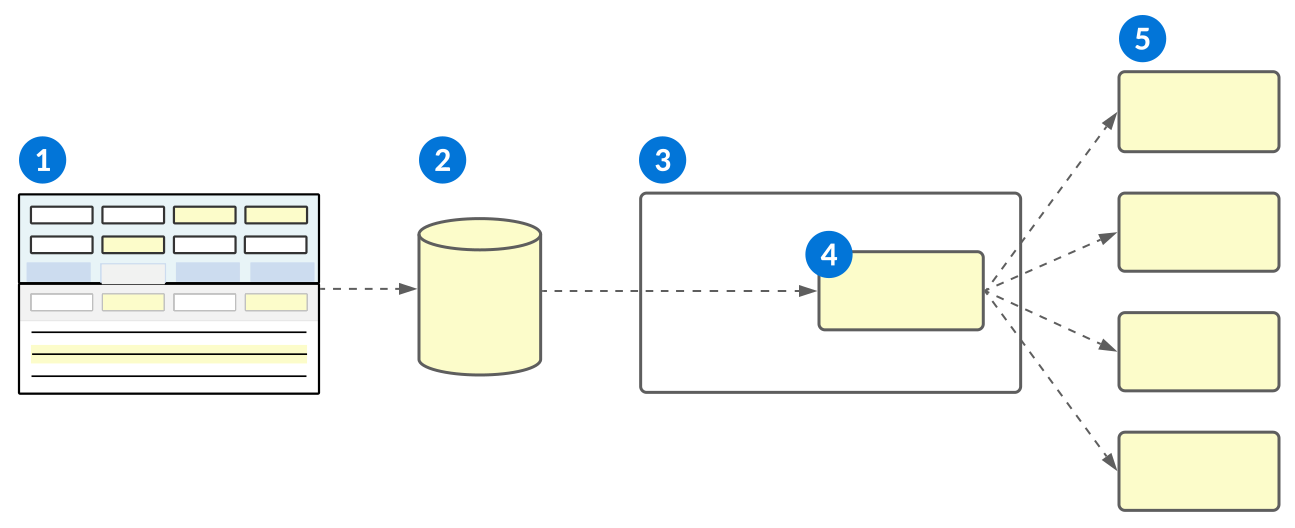
 | An event definition is configured that specifies:
|
|---|---|
 | An event rule and external event target definition subscribe to the event definition that specifies:
|
 | Your external AWS EventBridge account. |
 | The refined payload is sent to the AWS Event Bus specified in the event rules and event external target definition. |
 | Subscribers to the Event Bus receive the payload information. |
Event configuration
Configure events to notify external targets when business data changes occur with the Event Definitions, Event External Target Definitions, Event Rules, and Event Status Inquiry applications.
Configure different parts of the event in the following applications:
- Event Definitions application—Define the criteria to initiate the event.
- Event External Target Definitions application—Define any external targets for the event payload. If your event definition is only being sent to internal targets, no configuration is needed in this application.
- Event Rules application—Receive event definition payloads, filter the results, and route them to the appropriate targets.
- Event Status Inquiry application—Review the status of emitted events, errors, and resubmit any event failures once the issue has been resolved. System administrators are also able to view payload content.
- Event Target Delivery Status application—Review the status of targets queued from an event.
- Logic Block Builder—Configure the logic block to initiate the event if the event definition type is a User-Defined Event.
Prerequisites
For external EventBridge targets, you must configure your AWS account to allow Nextworld to send events. Contact support for help with implementation.
Event Definitions
In the Event Definitions application, you must:
- Create a new record and provide it with a unique name. This name is referenced in the Event Rules application.
- Select the Event Type. This determines what type of business process initiates the event, such as:
Workflow State Change—The event initiates when a record's workflow state is changed.- Define the Workflow To State and Workflow To State Type for the event.
- Optionally, select a Workflow Type to further refine the type of record which can initiate the event.
User-Defined Event—The event initiates from a user defined event, such as a logic block. If a logic block queues a user-defined event then later throws an error, the whole logic block, including the event, is rolled back. Any record updates aren’t committed and the event isn't initiated.
- Add an Event Definition detail for each source table you want included in the payload. For workflow state change event types built over a Standard table you may only include a single entry. For Header Details, you can include an entry for both the Header and the Detail if the Detail table is the driving table of the event. For user-defined event types, you may have up to five payloads configured.
- Provide a unique name for each detail in the Payload Key field. This name is referenced in the Event Rules application.
- Open the detail to select the fields from your driving table which you want included in the payload.
Event External Target Definitions
If your event definition is using an EventBridge as an external target, there are additional steps that must be completed in the target AWS account. Learn more in AWS EventBridge configuration.
Then, in the Event External Target Definitions application, you must:
- Create a new record for each external target you want the event payload sent to, and provide it with a unique name. This name is referenced in the Event Rules application.
- Enter the type of target, and the Id used to identify where the payload information should be sent. For EventBridge targets, the value is the Amazon Resource Name (ARN) of the EventBridge Bus in the external AWS account which you want the events routed to.
- In the Role field, enter the IAM Role from the target AWS account.
Event Rules
In the Event Rules application, you must:
- Create a new record, and reference the event definition name. Some fields are automatically populated from the definition.
- Optionally, add filters to refine the records from the definition source tables which are included in the payload.
- Reference the Payload Key for the source table which you want to filter.
- For events of type
Workflow State Change, you can also add Workflow From State, Workflow From State Type, or a Workflow Type if it has not previously been defined on the definition.
- In the Targets subtable, create an entry for each target you want the payload sent to.
- Provide each target with a unique name. This name is referenced in the Event Target Status Inquiry application when reviewing event statuses and errors.
- If the target is an external target, provide the unique name of the event external target definition you configured.
- If the target is a logic block, in the Logic Block Input/Output Name field, enter the unique name of the data source in the logic block's Input and outputs subtable. The logic block must be either a Transaction or Background Task type logic block, and it can only have one input/output specified in the Inputs and outputs subtable.
- Select the Active checkbox and save the record to activate your event rules.
Logic Block Builder
If your event type is User-Defined Event and will be initiated by a logic block, in the Logic Block Builder, you must:
- Open the appropriate logic block and select the Queue Event action.
- In the Event Name field, reference the name of the event definition.
- Map any additional payload entries.
Event Status Inquiry
In the Event Status Inquiry application, filter the list for your event definition and review the status. Events with a status of Delivered were successfully emitted and routed to their targets, and no further action is needed.
Other statuses indicate the event has not been successful, and may require review, such as:
Warning—The event did not reach one or more of the targets defined in the Event Rules application. Open the detail form of the record and review the Event Targets for more information.Error—The event errored when it tried to initiate. Open the detail form of the record and review the Emission Error(s) field for more information.
Once any issues have been resolved, select the Resubmit Event form action in the detail of the record.
AWS EventBridge configuration
Configure an AWS EventBridge as an external event target for your events.
In the target AWS account, you must:
- Create a new EventBridge Event Bus.
- Copy the Event bus ARN.
- Create an IAM role that grants access to the action
events:PutEvents. This role is assumed by Nextworld in order to publish an Event on your Event Bus.- Add a Trust Relationship to the role to enable Nextworld to assume the role.
- Contact the Nextworld Cloud Operations team to get the Nextworld account number.
Event Definitions application
Application developers use the Event Definitions application to define the criteria to initiate events.
Event definitions are part of a multistep configuration. Learn more in Event configuration.
Criteria for an event definition include:
- The type of event, such as a workflow state change or user-defined event, which initiates the event process.
- The fields from the underlying table which should be included in the event payload.
Select the Add Event Definitions Detail button to create a payload entry. The Payload Key field is a unique name which is used to identify the payload entries in the Event Rules application. If the driving table is the Detail table of a Header Detail, you can optionally include an entry for the Header table if you want header fields included in the payload.
Use the Edit row action to open the detail for each entry. Define which fields should be included in the payload.
Workflow State Change
For Workflow State Change event types, you must define the Workflow To State and Workflow To State Type which a record must reach to initiate the event. Optionally, select a Workflow Type to limit the event definition to only a certain type of record.
Event External Target Definitions application
Application developers use the Event External Target Definitions application to define the target type and unique identification for external targets of event payloads.
Event external target definitions are part of a multistep configuration. Learn more in Event configuration.
Create a record for each external target you want event payloads sent to. The unique name of the record is used in the Event Rules application to link the definition, rules, and external target.
Specify the Id. For example, with a target type of EventBridge, you must specify the Amazon Resource Name (ARN) of the EventBridge Bus which you want events routed to when the target is invoked.
Event Target Delivery Status Inquiry application
Application developers use the Event Target Delivery Status Inquiry application to track details of event target delivery, including their type, status, and emitting user.
Select the Bulk Resubmit Event to Targets form action to initiate a bulk resubmission of all failed event to their specified targets.
Event Rules application
Application developers use the Event Rules application to receive event payloads defined in the Event Definitions application, filter the results, and route them to the appropriate targets.
Event rules are part of a multistep configuration. Learn more in Event configuration.
General
Create a new event rule record for each event definition you define. Enter the name of your event definition to pull in details from the definition record.
Filters
Optionally, apply numeric value filters to fields from the source table to limit the type of records which can initiate the event. For example, if you only wanted records included from the Sales Order detail table which have a Requested Quantity of more than 10, that fall within the date range of January 01, 2023 and June 30, 2023, you could configure the Filters subtable with:
| Payload Key | Field | Operator | Value |
|---|---|---|---|
| SalesOrderDetail | RequestedQuantity | Greater Than | 10.00 |
| SalesOrderDetail | RequestedDate | Greater Than | 12/31/22 |
| SalesOrderDetail | RequestedDate | Less Than | 07/01/23 |
For definitions of type Workflow State Change, you can also select a Workflow From State, Workflow From State Type, or Workflow Type which the record must match in order for the event to be routed to the provided targets.
Targets
Configure the targets which should receive the event payload when events match the filter criteria defined in the filters. Targets can be of type External or Logic Block.
For targets of type External, you must include the External Target Name for a target defined in the Event External Target Definitions application.
For targets of type Logic Block, you must enter the name of the data source from the logic block's Input and outputs subtable in the Logic Block Input/Output Name field.
If your target is a logic block built over a Header Detail structure, there are additional configuration options required. Learn more in Event configuration.
Event Status Inquiry application
Application developers use the Event Status Inquiry application to track details of emitted events, including their status, payload content, target, and errors.
Events are part of a multistep configuration. Learn more in Event configuration.
Filter the list form for your event definition. Events with a status of Warning indicate that the event did not reach one or more of the targets defined in the Event Rules and Event External Target Definitions application. Events with a status of Error indicate there was an error when the event was initiated.
Select the Bulk Reroute Failed Events form action to initiate a bulk resubmission of all failed events.
Open the detail form of an event record to review information on event failures. Once issues have been resolved, select the Resubmit Event form action to resubmit that specific event.