















Servers typically have many different APIs, and each API can allow access to multiple types of resources on the server. For example, Avalara is a cloud-based tax software which many systems, including Nextworld, use for tax calculations and compliance. Avalara has many APIs, such as an API for cross-border transactions, and another for short-term property rental tax compliance. The API for short-term property rentals has resources for VRBO, AirBNB, and FlipKey available at the same endpoint location.
APIs work by a client sending a request to the API for information or for a service, then the API sending a response back to the client. Nextworld uses a type of API called REST APIs, which designate an HTTP request method, such as GET, PUT, or DELETE, to indicate what type of action the API request is performing. For example, an API request with a GET HTTP method is used to fetch data, while an API with a PUT HTTP method is used to update data.
The diagram below illustrates how a client sends a request to an external server's API:
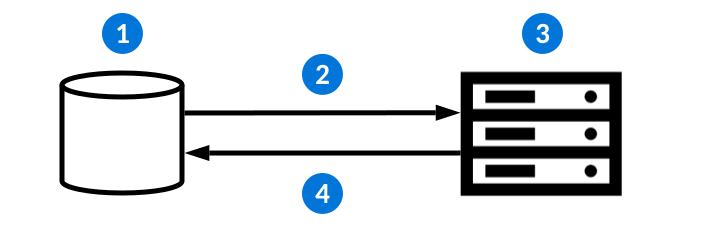
| Action | Example | |
|---|---|---|
 | The client initiates a request to the external server's API. | The Supplier Invoices application has a Calculate Tax form action. When selected, a logic block initiates an endpoint request. |
 | A request is sent to an API which contains the:
| The endpoint definition initiates a request to Avalara for a tax calculation. |
 | The API receives the request. | Avalara's tax calculation API receives the request. |
 | The external system sends a response back with a:
| Avalara's API sends a response with the requested tax calculation back to Nextworld. Logic blocks then use the provided response body to populate fields in the Supplier Invoices application. |
Endpoint request and response options for calling external API endpoints are configured in the Endpoint Definitions application. Learn more in Outbound endpoint configuration overview.
To learn more about external systems requesting information from Nextworld APIs, see the Inbound endpoint requests topic.
Correlation IDs
Correlation IDs are a unique identifier that enable you to track multi-system updates resulting from a single user action. The nwCorrelationId system field is automatically associated with processes such as webhooks, workflow transitions, jobs, events, summary tables, and inbound and outbound endpoint calls. If the Correlation ID on a Nextworld process is empty, the system generates one and logs it on all associated processes.
For example, an external system could make an endpoint call into Nextworld that includes a nwCorrelationId. This call results in a chain of processes including a workflow transition, background task, and an endpoint call to a third-party provider. Records logged in the Workflow Queued Transition Inquiry, Jobs, and Endpoint Logging applications would contain that correlation Id value, and the outbound endpoint call could optionally include it in the request payload. This is useful for identifying where and why a process failed.
Inbound endpoint calls have nwCorrelationId available in the Request Header. More information is available in the Endpoint Documentation accessible from the Sidebar menu under Integrations. You must navigate to a dashboard page before opening the menu to see the Integrations section.
Outbound endpoint calls can map nwCorrelationId in the Endpoint Definitions application. It may be selected in the Request Header, Request Body, or Query Parameters by navigating to the Request page and adding an entry where the type is Correlation ID.
Inbound endpoint requests
Inbound endpoint requests are when an external system calls Nextworld APIs to receive information from the platform.
Inbound requests
Inbound endpoint requests can be used for multiple processes, such as:
- Initiating a logic block
- Inserting, updating, or deleting records from a table
- Fetching records from a table
All logic blocks and tables created in Nextworld automatically have a set number of endpoints available. If you call a table's endpoint, any action blocks configured over the table are initiated.
For example, CRM may perform inbound requests to insert customer data into the internal Customers table, create sales orders in the Sales Order tables, and fetch current order statuses from the Sales Order table.
Environment
If you don't provide an environment or lifecycle in your request body, the credentials used for the endpoint call are used to derive the default environment and lifecycle. All subsequent calls are also within that environment and lifecycle.
Optionally, you can select a different environment and lifecycle. For example, if your default environment is a production environment but you want to make an endpoint call into a development or test environment you would specify that environment in the request body of the authentication request.
Authentication
When an external system calls Nextworld, the first call is to authenticate. Nextworld supports Basic Authentication and Client Credential protocols. Learn more in Client Credentials application step.
When an authentication request is made to the platform, the JSON response provides the protocol://host:port that must be used for subsequent requests, as well as a set of Tokens. The Access token expires every 8 minutes and enables you to make inbound API calls to Nextworld. The Refresh token lasts for several hours and can be used to refresh the access token or to change to a different environment. Subsequent calls to the platform are authenticated and allowed to request information while your tokens are active.
Client Credentials application step
In the Tenant Environment Setup application, use the Client Credentials application step to configure authentication for inbound integrations coming into the platform. This allows external systems to authenticate with Nextworld and get access tokens for making API calls without requiring a user to manually sign in.
There are several authentication types currently supported, including:
Token Exchange—Uses a token provided by an external identify provider (IdP) and exchanges it for a platform token at runtime. This allows you to authenticate with a third-party IdP and use that trusted relationship to authenticate with Nextworld.JWT Assertion—Uses a self-assigned JSON Web Token to authenticate directly with the platform. This allows you to authenticate with the platform without requiring an external IdP. Authentication occurs when you sign the JWT with a private key, then the platform verifies the signature with a public key.
JWT Assertion specifications
Review the following specification documents for JWT Assertion authentication from Internet Engineering Task Force (IETF):
Endpoint logging
Enable endpoint logging in your endpoint definitions to view information about successful endpoint calls. Failure cases of unhandled response codes and exceptions are logged automatically.
To enable logging on a new endpoint definition, select the Enable Logging checkbox. To turn logging on for an existing endpoint definition, you must either customize the definition and select the checkbox, or use an environment override. Learn more in Environment overrides.
Use the Endpoint Log Inquiry application to view log information, including:
- Fully resolved URL after dynamic substitution and query parameter construction
- HTTP headers with substituted dynamic content
- Request body up to 100Kb in size
- Response code
- Response body
Learn more in Endpoint Log Inquiry application.
Endpoint Log Inquiry application
Use the Endpoint Log Inquiry application to access records for before and after successful and failed endpoint calls. Failure cases of unhandled response codes and exceptions are added to the endpoint log automatically.
This application provides contextual information about the call and the endpoint itself. It also includes:
- Fully resolved URL after dynamic substitution and query parameter construction
- HTTP headers with substituted dynamic content
- Request body up to 100Kb in size
- Response code
- Response body
Logs are created based on the Enable Logging checkbox in the Endpoint Definitions application. By default, endpoint definitions have this checkbox cleared which means logs are only created for failed requests. When the checkbox is selected, a log is created for every interaction in the endpoint.
Endpoint Definitions application
Use the Endpoint Definitions application to configure an endpoint request to an external system. This application allows you to describe the external endpoint to be called, how to construct the request, and how to interpret the response(s).
The defining information of an endpoint is stored in the Endpoint Definitions application header. After the header information is entered, you can further specify your endpoint definition using the application's pages.
General page
On the General Page, you configure:
- The type of authentication request used by your endpoint.
- Any endpoint secrets you want to enforce for authentication. Secrets work like a username and password that someone must know to authenticate that they are allowed access to a certain endpoint. You can use multiple endpoint secrets for any type of authentication, but
Basic Authrequires you to define at least one secret in the Authentication Secret field. Select the View Secret field action to open the Endpoint Secret Setup application. - The length of time before a request times out, the number of times a request is attempted, and how long to wait before attempting another request attempt.
- Whether the endpoint only logs failed attempts, or if it logs every request attempt, response, and failure. Log records can be viewed in the Endpoint Log Inqiry application.
Request and Response pages
In the Request page, build the parameters of your endpoint request. You can use the Visual Data Mapper, or turn the toggle off to access the subtable. To use the visual data mapper, drag an arrow from a source to the appropriate request body. Select the line connecting the two data points to view or edit the properties.
In the Response page, choose an existing set of response codes or create a new one.
For information about endpoint configuration, see the Outbound endpoint configuration overview topic.
Endpoint Response Set Definitions application
Use the Endpoint Response Set Definitions application to build a list of codes which describes the handled HTTP response codes in an endpoint definition. Each endpoint response set describes the response handling for one or more endpoints.
HTTP status codes indicate the success or failure of an endpoint request, and the response set interprets the server's responses. For example, if someone is attempting to request data from an external system that doesn't exist, you might set up a 404 status code to indicate that no entity exists. Reference the World Wide Web Consortium for a list of all valid HTTP status codes and their definitions.
Access the Endpoint Response Set Definitions application from the Navigation Menu, or from the Configure Response Set field action in the Endpoint Response Set Definitions application.
The Response Mapping Table field defines where to map the data returned from the endpoint call. This table is populated with one or more records depending on the shape of the response, and those records become available in the logic block after calling the endpoint. Learn more in Call External Endpoint action.
The Endpoint Response Codes subtable configures which HTTP response codes you want handled in the endpoint. Values can be entered as exact matches to the HTTP response code, such as 200, 401, or 402, or they can be entered to match a range of HTTP response codes. To match a range of HTTP response codes, the value must begin with at least one digit followed by one or more x characters. For example, 5xx matches all 500 series HTTP response codes. 40x matches all HTTP response codes between 400 and 409.
Use the Manage Response Code form action to further define your response codes' behavior. Open the detail view of the response code records to refine the configurations.
For information about endpoint configuration, see the Outbound endpoint configuration overview and Endpoint request configuration topics.
V3 endpoint deprecation requirements
This topic reviews the V3 endpoint deprecation requirements and deadlines for third party integrators calling into platform APIs.
| Start Date | Deadline to Update | Deprecated Endpoint | New Method and API | Notes |
|---|---|---|---|---|
| March 2026 | December 2027 | Data mutation endpoints:
| V3 APIs that simplify the interaction and improve the performance for Subtable Main table operations:
| Endpoint calls into tables WITHOUT Subtable Mains included must change any V2 to V3 in the URL. Endpoint calls into tables WITH Subtable Mains included:
Best practices:
|
Example JSON for V3 APIs:
{
   "records":[
      {
         "appData":{
            "nwId": "d294cab1-bad0-428a-b19a-48785310c0bd",
            "Name": "Updated Test Record,
            "SubtableMain":[
               {
                  "nwId": "d65c938c-9f24-49c4-b66a-6dcac5d28084",
                  "Description":"Record being deleted",
                  "nateDisposition":"DELETED"
               },
               {
                  "nwId": "d65c938c-9f24-49c4-b66a-6dcac5d28087",
                  "Description":"Record being updated",
                  "nateDisposition":"UPDATED"
               },
               {
                  "nwId": "d65c938c-9f24-49c4-b66a-6dcac5d28089",
                  "Description":"Record being ignored",
                  "nateDisposition":"PRISTINE"
               },
               {
                  "Description":"Record being inserted",
                  "nateDisposition":"INSERTED"
               }
            ]
         },
         "nateDisposition": "UPDATED",
         "version": "bv.MjAyNi0wMS0wNlQyMToxOTowMC4xNTcyODJa"
      }
   ],
   "createContainer":true,
   "commitContainer":true,
   "ignoreActionBlocksOnCommit":false
}