

Expense policy compliance tracking
Problem
Employee expense reports and the policies that govern them often live in separate spreadsheets with no connection between the two. Finance has no way to catch a policy violation or a missing receipt until after a report has already been paid, and no simple view of what the organization is actually spending by department or category.
Solution
A custom Expense Tracker application that gives employees and finance a single place to submit expense reports, reference the policies for each expense category, and review expenses broken down by department, status, and category. Reports are flagged automatically when a line item breaks a policy limit or a receipt is missing. Financial teams can see outstanding balances and policy exceptions as they happen instead of catching them in a manual audit weeks later. Employees can check the rules for a category before they submit instead of guessing and having a report sent back.
At a glance
Vertical
Cross Industry
Used By
Finance
Legal & Compliance
Operations
Building Blocks

Custom Applications
Workflow

Logic Blocks

Dashboards

Building Blocks
This solution was built using these Nextworld features
Custom Applications
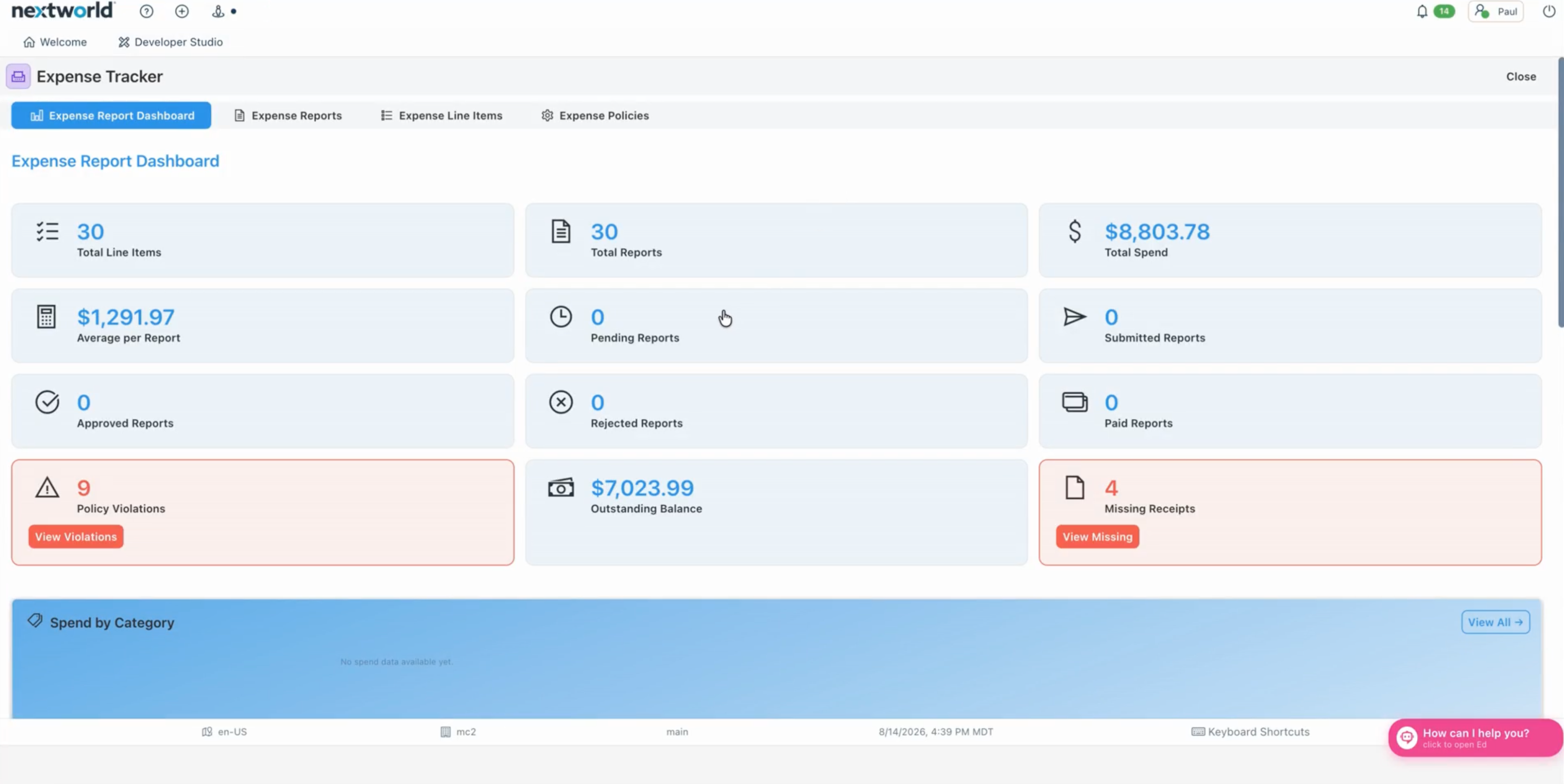
The Expense Tracker App connects expense reports to their line items, with supporting tables for departments, employees, and expense policies. Table lookups connect each line item to its policy category and each report to an employee and department, so spend can be broken down by either one on the dashboard. One application ties together a dashboard, a report list, a line item list, and a policy library so users never have to leave the app to check a rule or a status.
Workflow
Each report moves through five defined states, from pending through submitted, approved or rejected, and finally paid. The workflow gives finance and employees a shared view of where a report stands and feeds the dashboard's status counts.
Logic Blocks
Logic blocks check each expense line item against its policy's approval limit and flag any outliers, check for missing receipts, and calculate things like total spend and average per report for the dashboard.
Dashboards
The Expense Report Dashboard gives a real time view of total spend, average per report, reports by status, outstanding balance, policy violations, and missing receipts, along with a spend by category breakdown.







Powering the teams behind modern operations
What will you build with Nextworld?
Bring us the process that costs you the most, and we’ll show you how it runs on an ERP you grow into, not out of.
